OBD Fusion (Car Diagnostics)
- 4.6
- Rating
- 100.00K
- Installs
- $5.99
- Price
 Analysis by App-foxy
I spend enough time around cars to know that a warning light can create more anxiety than information. You see an icon on the dashboard, wonder whether the car is safe to drive, and then face the choice between guessing, visiting a workshop, or buying a diagnostic tool. OBD Fusion takes the phone-based route: it is a communication app from OCTech, LLC that reads OBD2 data and diagnostic trouble codes, then presents that information in a more usable form than a basic handheld reader.
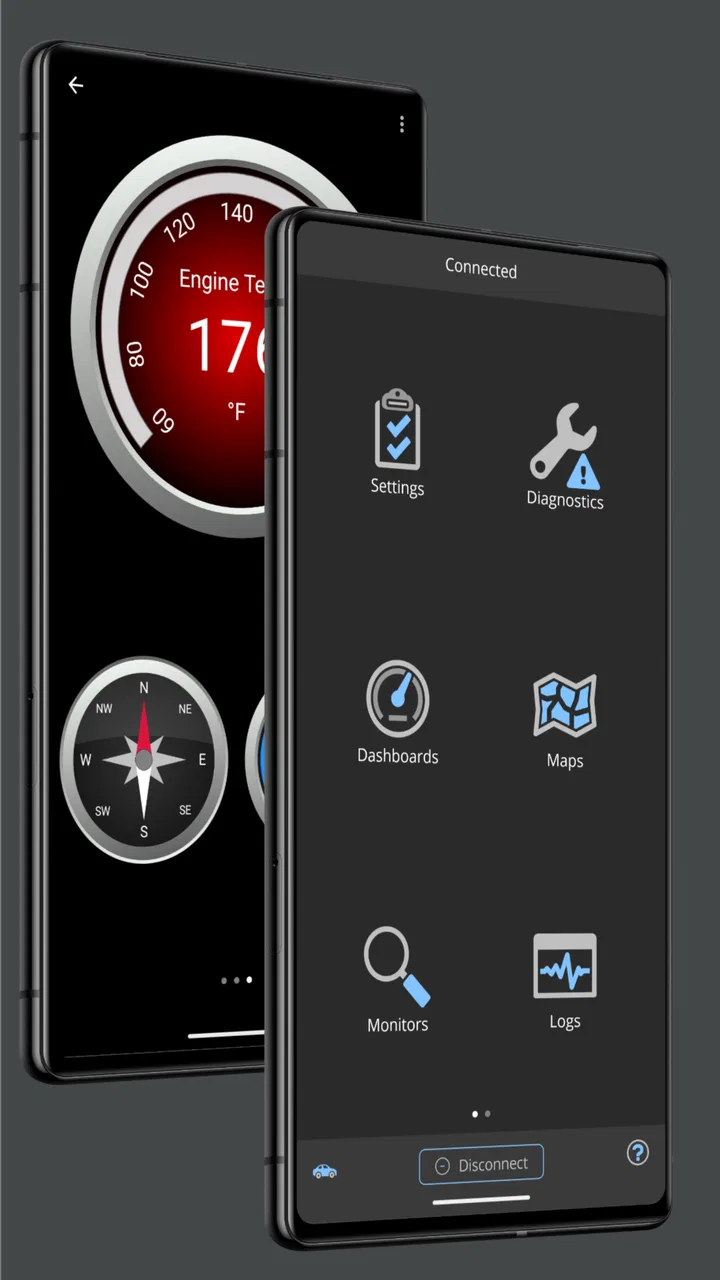
My first impression is that this is not really aimed at someone who wants a novelty dashboard for a weekend. It makes more sense for a driver who wants to understand a vehicle’s behavior, a careful owner who prefers to investigate before booking service, or a hobbyist who enjoys watching live engine information. The app also supports custom dashboards and offers enhanced diagnostics, so it can grow beyond simply clearing up the meaning of a warning light.
The important distinction is that a phone app cannot diagnose a car by itself. You still need compatible OBD2 hardware and a vehicle that exposes useful information through its diagnostic system. In practice, the quality of the adapter, the vehicle, and the user’s interpretation all affect the result. That is why I see this as a capable diagnostic interface rather than a replacement for a trained mechanic.
You May Also Like

 Blood Strike: 2.5 Anniversary
Blood Strike’s Loadouts Turn Every Drop Into a Tactical Gamble
A close look at Blood Strike’s custom loadouts: how fast access to signature weapons reshapes its battle royale rhythm, rewards preparation, and narrows the gap between fights.

 Pandora - Music & Podcasts
Pandora’s Music Is Easy to Start, but Harder to Recover
Pandora’s strength is its low-effort path from a seed to a station. Its weak spot is how much confidence it asks you to place in connection, setup, and quiet recovery.

 8 Ball Pool
 Is Built on Rivalries, Rematches, and Routine
A close look at the rivalries, rematches, shared routines, and unanswered safety questions that turn a quick pool match into a persistent mobile community.

 Samsung Music
’s Quiet Strength Is Playing What You Already Own
Its reach comes less from spectacle than from dependable access to a personal library. That simplicity is both the app’s strongest retention engine and its ceiling.

 AccuWeather: Weather Radar
AccuWeather Review: A Quick, Clear Forecast for Everyday Decisions
For everyday plans, the best forecast is the one you can understand quickly. AccuWeather makes rain timing, radar, and local conditions easy to act on, with a few trade-offs.

 Hill Climb Racing
Why Hill Climb Racing Still Turns Crashes Into One More Run
A tiny car, a bumpy hill and one more upgrade: Hill Climb Racing keeps resurfacing because its simple chaos makes every near-miss feel personal.
More From Our News Desk



What OBD Fusion actually gives you for the money
The Android version is listed at $5.99, which puts it firmly in the paid-app category rather than the usual free download with a limited trial. There are also in-app purchases priced from $14.99 to $74.99 per item. I would therefore look carefully at the exact diagnostic functions I need before spending more, because the initial purchase and optional additions represent different parts of the overall cost.
That pricing structure is easier to understand when the app is treated as a tool rather than entertainment. If it helps me identify whether a fault is likely to be minor, intermittent, or urgent before I arrange repairs, the purchase can be sensible. If I only want to check a warning light once and never look at vehicle data again, a cheaper basic scanner may be a better fit.
The app has been available since June 7, 2012, and its current version is 7.4.0. It runs on Android 7.0 or later, so owners of older phones should check compatibility before planning around it. Its Everyone content rating also makes it broadly suitable from an age-classification standpoint, although the technical subject matter is naturally more useful to adults who are comfortable working around vehicle information.
Its public reception is encouraging: the app holds a 4.6 average from around 3.2 thousand ratings, with 561 written reviews and over 100 thousand installs. Those figures do not guarantee that it will work equally well with every car or adapter, but they do suggest that it has found a sustained audience rather than being a lightly used experiment.
Where the paid value becomes clear
The strongest value is the combination of readable fault-code information and live vehicle data. A simple code reader may tell me that a fault has been stored, but the useful next step is understanding what the car is reporting at that moment. Seeing changing values can help me notice patterns that a single code cannot show, especially when the problem appears only under certain conditions.
Custom dashboards are another reason to choose this app over a very basic scanner. I can arrange the information I care about instead of repeatedly moving through unrelated screens. For a commuter, that might mean keeping a small set of driving-related readings visible. For a hobbyist, it may mean creating a layout for checking engine behavior during a test drive. The practical benefit is not decoration; it is reducing the time spent hunting through menus.
Enhanced diagnostics make the app more interesting for users who have already outgrown generic code reading. The exact usefulness depends on the car and the connected hardware, so I would not assume that every vehicle exposes the same depth of information. Still, having a path beyond the most basic OBD2 functions gives the app more room to justify its paid entry point.
The best value comes from repeated, informed use rather than a single emergency scan. I would use it to record what the car is doing, compare symptoms before and after maintenance, and prepare better questions for a repair shop. That workflow turns a phone into an observation tool, not merely a device for erasing a dashboard message.
A realistic driveway scenario
Imagine the check-engine light appears on the way home, but the car still feels normal. I would connect a compatible adapter, open the app, and read the stored diagnostic trouble code instead of immediately assuming the worst. I could then note the code, look at the available live information, and decide whether the car seems suitable for a cautious trip to a workshop or whether it should remain parked.
The useful part is the conversation that follows. Rather than telling a mechanic only that “the light came on,” I could provide the code and explain when it appeared. That does not prove the failed component, but it can make the initial discussion more precise. If the light returns after a repair, having an earlier record may also help separate a new symptom from an unresolved one.
I would be careful about clearing the code too soon. Erasing a warning can remove useful evidence and may make it harder to see whether the problem returns. The app is more valuable when I use it to observe and document first, then clear anything only when I understand why doing so is appropriate.
Custom dashboards are useful when you design them around a question
A common mistake with live vehicle data is displaying everything simply because it is available. That produces a busy screen and encourages random glances rather than useful observation. With OBD Fusion, I would build a dashboard around one purpose: checking how the car behaves during warm-up, watching a suspected issue, or monitoring a particular trip.
For example, I might create one layout for stationary checks and another for driving. The first could help me compare readings after the engine reaches normal operating conditions. The second could keep only the values that are safe and practical to glance at briefly. This separation is a small but important usability improvement, because a dashboard designed for diagnosis is not automatically suitable for use while moving.
There is also a trade-off here. Customization takes time, and a new user may not know which readings matter. The app can present information, but it cannot replace an understanding of what a value means for a particular engine. I would start with a narrow objective, avoid filling the screen with gauges, and treat unusual readings as clues for further investigation rather than instant proof of a failed part.
What the app cannot solve on its own
OBD2 data is not the same as a complete inspection. Mechanical faults can exist without producing a code, and a stored code often identifies a system or condition rather than naming the exact component that needs replacement. Wiring, vacuum leaks, worn parts, and intermittent problems may require tests that a phone interface cannot perform.
Compatibility is another practical limitation. The app needs a suitable OBD2 connection, and the vehicle determines which information is available. A user buying the app without checking the adapter and car combination could end up disappointed even though the application itself is functioning correctly. I would confirm the hardware arrangement first, especially if enhanced diagnostics are the main reason for the purchase.
Live information can also be distracting. I would never treat a dashboard full of gauges as something to study continuously while driving. Set up the screen before leaving, keep attention on the road, and use a passenger or a stationary test when detailed observation is necessary. The app’s usefulness should never encourage unsafe behavior.
Finally, technical confidence matters. Someone who expects a single button to announce the exact repair may find the experience frustrating. OBD Fusion gives more context than a bare code reader, but that extra context creates more decisions. In my view, that is a strength for curious owners and a weakness for anyone who wants a completely hands-off answer.
How it compares with ordinary alternatives
The usual alternatives fall into three groups: a basic handheld code reader, a free phone app paired with an adapter, and professional workshop equipment. OBD Fusion sits between the first two and the last one. Compared with a simple reader, it offers a more flexible screen and a better opportunity to watch information over time. Compared with a free app, its paid structure may feel less attractive, but the focused diagnostic design can be more worthwhile for someone who expects regular use.
Professional equipment remains the better choice for a repair business or for tasks that require manufacturer-level access and specialist testing. I would not buy this app expecting it to replace workshop tooling. Its role is more practical for everyday ownership: helping me understand a symptom, gather useful observations, and avoid paying for a diagnostic visit when the issue is minor or already familiar.
The comparison changes depending on how often I work on cars. A driver who never opens the hood and would call a mechanic for every warning light may gain little from a paid diagnostic interface. A person maintaining several vehicles, buying used cars, or tracking recurring faults can get much more value because the same tool can be used repeatedly across different situations, subject to compatibility.
Who should spend time learning it
I would recommend OBD Fusion to owners who want more control over basic vehicle diagnostics without immediately investing in professional equipment. It is especially appealing if you enjoy understanding what your car is reporting, want custom views for repeated checks, or prefer arriving at a repair appointment with better information.
It can also suit a careful used-car shopper, provided the seller allows a proper inspection and the buyer understands that a clean scan is not a guarantee of mechanical health. Reading codes and available data can add one useful layer to a broader inspection, service-history review, and road test. It should not be the only reason to trust a vehicle.
I would skip it if my only goal is a one-time code lookup and I already have access to a reliable scanner. I would also choose another route if I need advanced manufacturer-specific diagnosis, programming, or a guaranteed professional interpretation. The app is most convincing when its recurring access to data matters more than the lowest possible upfront cost.
My buying advice before opening the app
Before purchasing, I would identify the exact vehicle and the OBD2 adapter I plan to use. I would then decide whether I need only standard code and data reading or whether enhanced diagnostics are important enough to justify the additional in-app purchase range. This prevents paying for a capability that the car or adapter may not expose.
I would also set expectations about learning. The first session should be treated as setup and orientation, not as an instant diagnosis. Connect carefully, learn which readings are available, create a simple dashboard, and save notes about normal behavior. Establishing a baseline when the car is healthy makes later changes easier to recognize.
For privacy and safety, I would keep the phone secured, avoid interacting with the app while driving, and disconnect the adapter when it is no longer needed unless I have a clear reason to leave it connected. Those are sensible habits for any phone-based car tool, but they matter especially when the app encourages frequent access to live information.
My final verdict on the purchase
OBD Fusion is a serious communication and diagnostic app with a clear audience. I like that it goes beyond translating a warning light into a code: custom dashboards make repeated checks more efficient, live OBD2 information adds context, and enhanced diagnostics give experienced users a reason to keep exploring. The developer, OCTech, LLC, has maintained the product across many years, and its current version shows that it remains an active option for compatible Android devices.
The cost is reasonable for a driver who will use the tool more than once, but the extra in-app purchases mean I would not treat the initial price as the complete answer for every user. The app earns its place when it helps me investigate symptoms, document patterns, and communicate more clearly with a mechanic. It is less compelling as a disposable emergency scanner or as a substitute for professional diagnosis.
My recommendation is to buy it if you already have compatible OBD2 hardware, enjoy a hands-on approach, and are willing to learn what the readings mean. If you want a single definitive repair answer, need workshop-level functions, or have no intention of using live data and custom dashboards, I would skip it and choose a simpler alternative. For the right owner, though, this is a practical way to turn a phone into a more informed window into the car.
FAQs for OBD Fusion (Car Diagnostics)
01What is OBD Fusion and what can I use it for?
OBD Fusion is a vehicle diagnostics and monitoring app that connects to a compatible OBD-II adapter, usually through Bluetooth or Wi-Fi. After connecting, it can display live engine data, read and clear diagnostic trouble codes, show sensor information, and provide customizable dashboards. It is useful for checking basic vehicle health, monitoring performance, or understanding why a check-engine light has appeared, although it is not a replacement for professional mechanical inspection.
02Which vehicles and OBD adapters are compatible with OBD Fusion?
OBD Fusion is designed primarily for vehicles equipped with a standard OBD-II port, including most cars and light trucks sold in the United States from 1996 onward. Compatibility can vary by country, model year, and manufacturer. The app also requires a supported Bluetooth or Wi-Fi OBD-II adapter. Before downloading, check the developer’s current compatibility information and confirm that your vehicle and adapter use a supported connection type.
03Can OBD Fusion diagnose and fix car problems automatically?
OBD Fusion can help identify problems by reading diagnostic trouble codes and displaying data from the vehicle’s electronic control systems, but it does not repair faults automatically. A code usually indicates an area that needs investigation rather than identifying one definite failed part. You can use the information to perform further checks or communicate more clearly with a mechanic, but serious, recurring, or safety-related issues should always receive professional attention.
04Does OBD Fusion require an internet connection or subscription?
The basic connection to your vehicle generally works through the paired OBD-II adapter, so an active mobile data connection is not normally required for reading live data or accessing many diagnostic features. However, certain functions, map-related content, updates, or additional data may depend on internet access. Pricing and optional purchases can change, so review the current App Store or Google Play listing to confirm whether your version includes subscriptions or paid add-ons.
05Is OBD Fusion safe and easy for beginners to use?
OBD Fusion is reasonably approachable for beginners, especially when used for reading codes and viewing common engine measurements, but the amount of technical data can feel overwhelming at first. Connecting the adapter while the vehicle is parked is the safest approach. Avoid changing unfamiliar settings, clearing codes before recording them, or using the app while driving. The app provides information, not guaranteed diagnoses, so interpret results carefully and seek expert advice when necessary.
Pros
- Reads and clears many OBD-II trouble codes quickly.
- Offers customizable gauges for live engine data.
- Supports trip logging with route and vehicle statistics.
- Can export diagnostic data for easier sharing or analysis.
- Works with several Bluetooth and Wi-Fi OBD adapters.
Cons
- Some advanced features require additional in-app purchases.
- Compatibility depends heavily on the vehicle and adapter used.
- Initial setup may feel technical for inexperienced drivers.
- Certain manufacturer-specific functions are unavailable on basic OBD-II.
- Continuous live monitoring can noticeably affect phone battery life.

OBD Fusion (Car Diagnostics)
Gallery